Your AI text stops sounding like AI: agents just got an editor
An open source skill for Claude Code, Codex and Cursor strips AI tells and rewrites text using an aviation clarity standard.
AI news faster than on the site — on Telegram KARMAZIN MEDIA
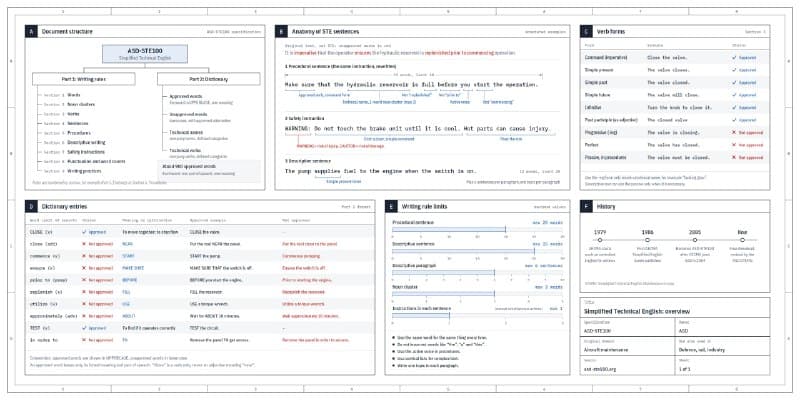
You know the problem: ask an AI agent for a README or an email and you get «Great question!», a dramatic closer and sentences that run three lines. A new open source skill, STE80 Humanizer, cleans that up. It installs into Claude Code, Codex, Cursor and other agents with one command: npx skills add Dodaios/ste80-humanizer.
It works in two passes. First it strips the 26 common tells of AI writing from the list Wikipedia editors put together: canned openers, fake transitions, stacked hedges, buzzwords. Then it rebuilds the sentences about 80% of the way to ASD-STE100. That is Simplified Technical English, created by the aerospace industry in the 1980s for aircraft maintenance manuals so a mechanic could never misread a step. Its rules are strict: up to 20 words per instruction, 25 per description, one idea per sentence, active voice.
The idea is not new. Back on October 2, Andrej Karpathy suggested asking models to explain things in ASD-STE100 because the result is much easier to read. The skill packages that tip into a ready tool, and it is only now spreading.
There are three modes: the default keeps your voice and your facts, light only removes the worst AI tells, and strict rewrites everything to the standard, meant for procedures and runbooks. You can also just ask whether an email sounds like AI without rewriting it. It is MIT licensed. The authors are upfront that the goal is readability, not dodging AI detectors.
Verdict: a free editor for everything your agents write. Worth installing for the READMEs alone.
 Tools
 Tools
 AI agents