Kick the AI agent off your Mac: now it gets one of its own
The free terminal-mac boots a separate macOS right inside your terminal. Claude Code, Codex and other agents click around in there while your own computer stays untouched.
AI news faster than on the site — on Telegram KARMAZIN MEDIA
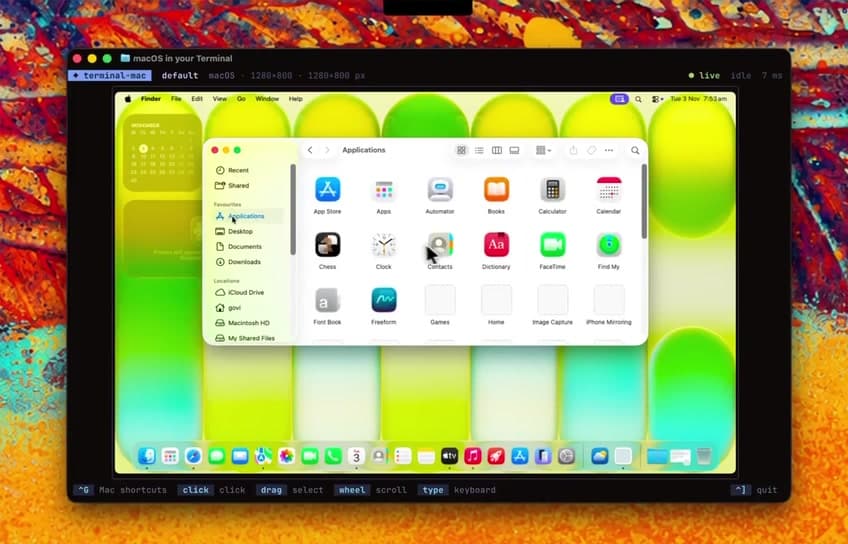
Yesterday a developer who goes by govi put terminal-mac on GitHub for free. The pitch is simple: an AI agent that needs a "computer with a mouse" no longer has to poke around your actual Mac. The tool spins up a separate macOS next to yours and lets the agent work there.
It runs on Apple's built-in virtualization, so the guest is real macOS, not a container. Its screen streams straight into a terminal window (Ghostty, Kitty or iTerm2), and you can watch the agent open apps, dig through settings, click buttons and test software. Your own pointer and clipboard stay put.
The agent drives the machine over MCP: screenshot, click, drag, scroll, type and key presses. Claude Code gets a ready plugin plus a skill that teaches the agent an observe, act, verify loop. Cursor, VS Code, Codex and Windsurf connect through a regular MCP config.
The real point is isolation. The guest Mac has its own apps, files, accounts and permissions. Your home folder, projects, clipboard, microphone and camera are not attached, and your signed-in sessions don't carry over. If the agent breaks something, it breaks its own machine.
You need an Apple Silicon Mac on macOS 14 or later and some free space: the first run pulls a macOS image of several gigabytes straight from Apple, and the virtual disk grows up to 64 GB by default. It installs with one command, no admin rights, under the MIT license. The author is upfront that this is an early release candidate without Apple notarization. The repo passed 850 stars in its first day.
If you've wanted to hand UI chores to an agent but feared for your laptop, this is the way out: let it wreck its own Mac, not yours.
 AI agents
 Tools
 Tools